
Newsletter: CommonJS, AMD & ES Modules — What They Are and Why They Matter


JavaScript has evolved a lot — but not all module systems evolved at the same pace.
If you’ve ever seen warnings like:
“CommonJS or AMD dependencies can cause optimization bailouts”
in Angular, this newsletter will finally make it click 💡
🧩 What Are JavaScript Modules?
A module is simply a way to:
Split code into files
Share logic between files
Control what’s public vs private
The problem?
JavaScript didn’t always have a native module system.
So… developers invented their own.
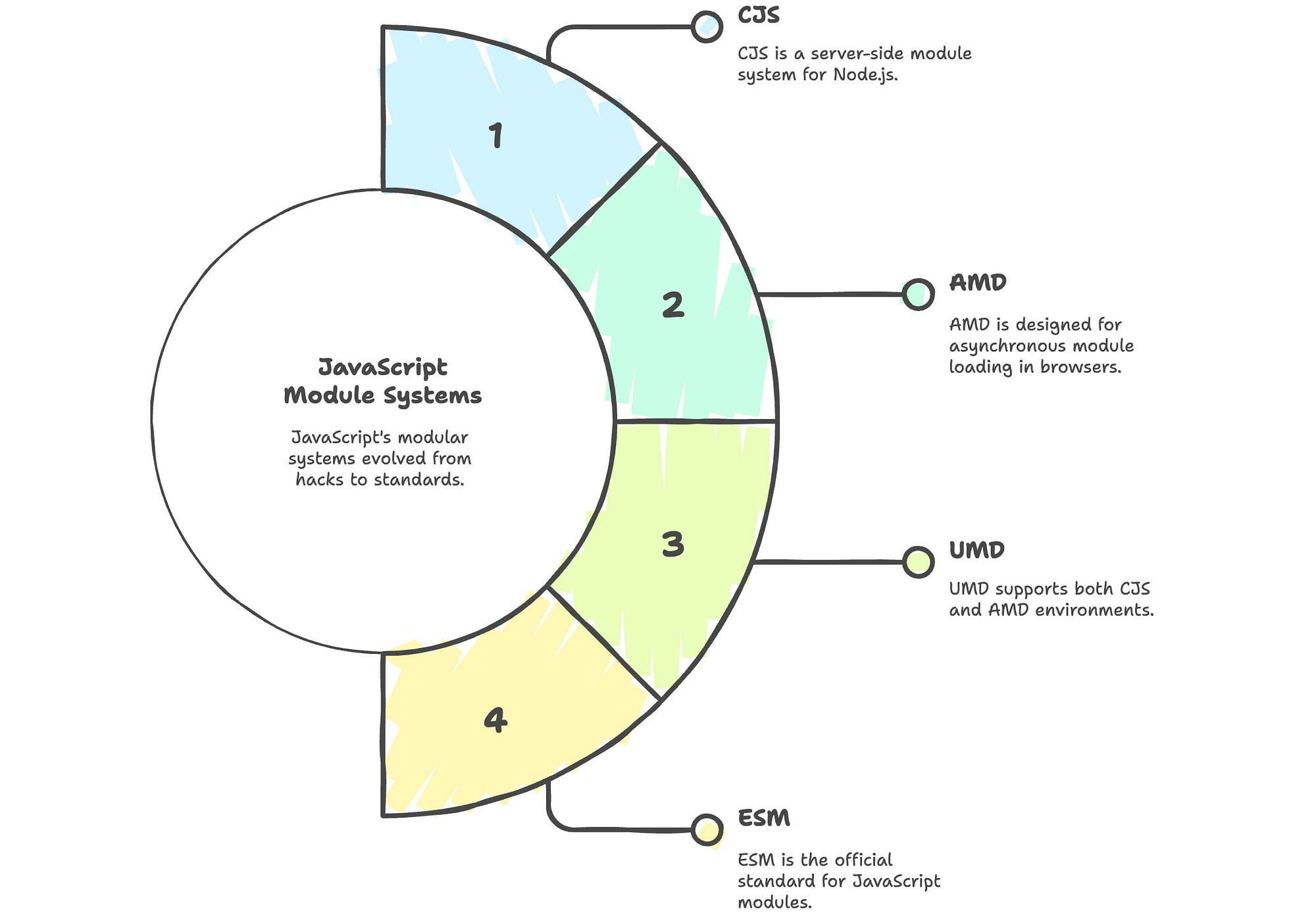
📦 CommonJS (The Old Workhorse)
CommonJS was designed for Node.js.
How it works (conceptually)
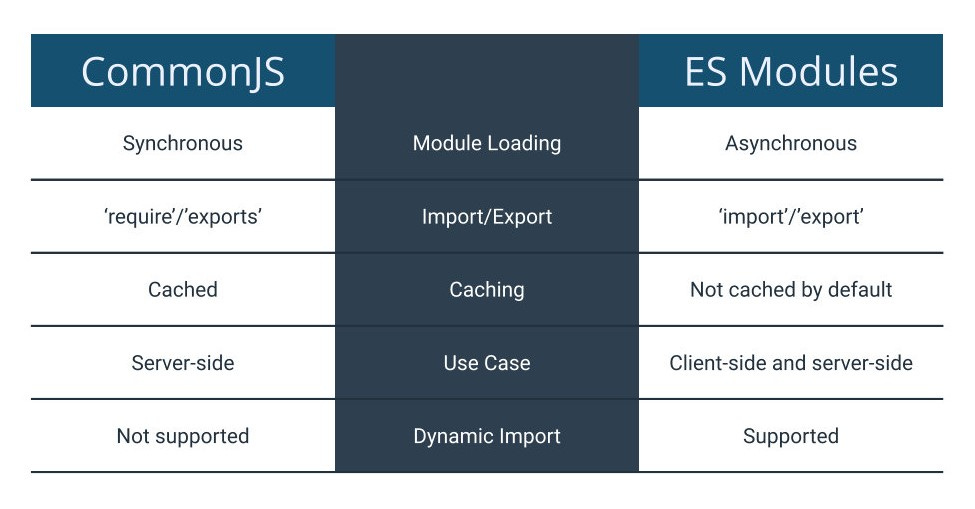
require()loads code at runtimeEntire file is imported
Bundlers can’t see usage clearly
Why it still exists
Node.js legacy
Huge npm ecosystem
Many old libraries still use it
Downsides
❌ No tree-shaking
❌ Bigger bundles
❌ Slower builds
❌ Not browser-native
CommonJS is why modern tools struggle to optimize your app.
🔁 AMD (Asynchronous Module Definition)
AMD was created for browsers before ES Modules existed.
Why AMD existed
Browsers didn’t support modules
Needed async loading
Required libraries like RequireJS
Today’s reality
Rarely used
Mostly legacy code
Kept alive for backward compatibility
Think of AMD as a historical solution, not a modern one.
✨ ES Modules (The Modern Standard)
ES Modules (ESM) are the official JavaScript module system.
They are:
Built into browsers
Built into Node.js
Understood by bundlers at build time
Why ESM is powerful
✅ Static imports
✅ Tree-shaking
✅ Smaller bundles
✅ Faster load times
✅ Better tooling
This is why modern frameworks love ESM.
🌳 Why Tree-Shaking Depends on ES Modules
Tree-shaking means:
Removing unused code before shipping to users
This only works when:
Imports are static
Dependencies are predictable
ES Modules enable this.
CommonJS and AMD block it 🚫
⚠️ Why Frameworks Warn You
When Angular sees:
require()CommonJS-style imports
It says:
“I can’t safely optimize this.”
So it triggers an optimization bailout:
No deep tree-shaking
Bigger JS files
Slower apps
🧠 Real-World Impact
Using legacy modules can cause:
Slower first paint
Higher JS payload
Poor mobile performance
Worse Core Web Vitals
Your app still works — it’s just heavier than necessary.
✅ What You Should Do as a Developer
✔ Prefer ESM libraries
✔ Check package.json for "module" or "exports"
✔ Update old dependencies
✔ Replace legacy packages where possible
✔ Allow CommonJS only intentionally
🔑 TL;DR
CommonJS → Old, runtime-based, hard to optimize
AMD → Legacy browser workaround
ES Modules → Modern, native, fast, tree-shakeable
ES Modules are the foundation of modern JavaScript performance.